
_ _ Infobelt
The Overlooked Costs of Bundled Cloud Archiving and Legacy Keep-Alive Licenses: A TCO Guide for Regulated Enterprises
When enterprise IT and procurement teams evaluate data archiving solutions, the conversation almost always starts with storage rates. A vendor quotes a few pennies per gigabyte per month, the math looks attractive on a spreadsheet, and the contract gets signed.
Five years later, the budget tells a very different story.
For regulated organizations in healthcare, financial services, manufacturing, and the public sector, data retention is rarely a short-term project. Compliance rules like HIPAA, SOX, GDPR, and SEC Rule 17a-4 require keeping records accessible and defensible for anywhere from seven to thirty years. Over that timeline, raw storage accounts for only a small fraction of your Total Cost of Ownership (TCO). The larger budget drains come from two places that rarely show up in an initial sales quote: bundled cloud archiving inefficiencies and legacy “keep-alive” application licenses.
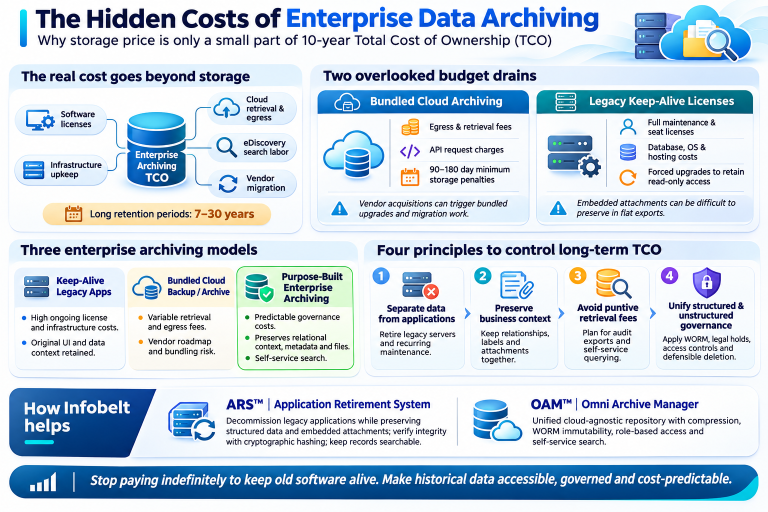
What is enterprise data archiving TCO? Enterprise data archiving Total Cost of Ownership (TCO) is the complete lifecycle expense of storing, governing, retrieving, and maintaining historical business records over multi-year compliance periods. Beyond base storage fees, true TCO includes software seat licenses, infrastructure upkeep, cloud data retrieval and egress charges, eDiscovery search labor, and vendor migration costs.
1. Bundled Cloud Archiving and Vendor Consolidation
Many organizations begin their cloud retention strategy by adding an archiving tier to an existing SaaS backup tool or moving inactive files into cold cloud storage. On paper, keeping backup and archiving under one contract feels convenient. In practice, operational backup and long-term compliance archiving follow completely different financial rules.
Storage Pricing Illusions: Egress, Retrieval, and Minimum Duration Fees
Cloud providers make it inexpensive and simple to upload data, while charging higher fees to pull it back out. Cold archive tiers advertise low monthly storage rates, yet they introduce strict rules that penalize routine governance:
- Data Egress Fees: Exporting records for a regulatory audit, legal hold, or vendor switch typically triggers outbound data transfer fees ranging from $0.05 to $0.09 per gigabyte. Across tens of terabytes, a single audit export can cost thousands of dollars.
- Retrieval and API Request Charges: Searching, rehydrating, and reading archived files incurs per-request fees and tier-specific retrieval surcharges. When legal teams run broad eDiscovery searches, those small charges add up quickly.
- Early Deletion Penalties: Many cold storage tiers enforce minimum retention windows of 90 to 180 days. If automated retention policies purge records early, the organization still pays for the remaining days.
How Market Consolidation Affects Cloud Archives
Beyond usage fees, enterprises face long-term roadmap shifts when specialized cloud archiving tools are acquired by larger data protection companies.
For example, cloud-native archiving platforms like HubStor started as independent tools focused on Microsoft Azure storage tiering and unstructured data retention, before being acquired by Veritas (rebranded as NetBackup and later Alta SaaS Protection) and subsequently folded into the Cohesity portfolio. When niche archiving products become part of a giant backup suite, customers often face shifting product priorities, bundled licensing upgrades that include backup features they do not need, and unplanned data migration projects if overlapping product lines are merged.
2. Legacy Keep-Alive Application Licenses
While cloud archiving drains budgets through usage and consolidation, a second expense sits inside on-premises data centers and private clouds: keep-alive licensing.
Why Organizations Pay Full Price for Read-Only Data
Every mature enterprise carries a collection of retired or low-activity applications. A company might move its daily operations to SAP S/4HANA, Salesforce, or Workday, yet leave dozens of older ERPs, custom databases, and departmental tools running in the background.
IT teams hesitate to shut these servers down because business users, auditors, and legal teams still need occasional read-only access to historical transactions, patient records, or engineering specs. Keeping the original application alive feels like the safest choice. However, software vendors do not offer a “compliance discount” simply because you stopped entering new records. You continue paying full annual maintenance fees, database licenses, operating system patches, and server hosting costs just to view static history.
The Departmental Database Challenge
This pattern is especially common with departmental low-code tools. Consider Claris FileMaker Pro, an actively supported platform that healthcare clinics, universities, and manufacturing teams have used for decades to build custom databases for scheduling, lab tracking, and asset management.
Even when an enterprise standardizes those workflows onto a central corporate system, historical departmental databases cannot simply be deleted. Retaining them creates compounding expenses:
- Recurring Seat and Server Licenses: Organizations keep paying for annual user seats and server infrastructure strictly so compliance officers or clinicians can look up old records.
- Forced Version Upgrades: Software vendors regularly end support for older client versions. To stay compatible with modern operating systems and security updates, IT teams must buy upgrades and test legacy scripts for an application the business no longer actively uses.
- Complex Embedded Attachments: Many departmental databases store scanned PDFs, medical images, and signed contracts inside container fields alongside structured tables. Exporting the records into flat CSV spreadsheets breaks the link between the record and its attachments, making the archive difficult to use during an audit.
3. Comparing Enterprise Archiving Models Over 10 Years
To see how these expenses compare across technical, functional, and financial dimensions, it helps to evaluate the three most common approaches to long-term data retention side by side.
Cost & Governance Factor |
Keep-Alive Legacy Apps |
Bundled Cloud Backup / Archive |
Purpose-Built Enterprise Archiving |
|---|---|---|---|
Software Licensing
|
High; full annual vendor maintenance and per-seat fees
|
Moderate to high; tied to broader backup suite tiers
|
Predictable; decoupled from legacy application seats
|
Audit & Retrieval Fees
|
Low direct fees, but high internal IT labor to run queries
|
Variable; subject to cloud egress and API retrieval charges
|
Transparent; self-service search with no punitive egress fees
|
Data Fidelity
|
High; preserves original UI, schemas, and attachments
|
Low for databases; built primarily for files and emails
|
High; preserves relational context, metadata, and files
|
Infrastructure & Security
|
High; requires ongoing OS patching and server upkeep
|
Managed SaaS, though tied to vendor cloud storage
|
Centralized, hardened repository with automated retention
|
Vendor & Roadmap Risk
|
High; exposed to forced upgrades and end-of-life support
|
Moderate to high; vulnerable to M&A bundling shifts
|
Low; dedicated focus on multi-decade compliance
|
4. Four Architectural Principles to Control Long-Term Archiving TCO
Whether you are a CIO defending an IT budget, a compliance officer preparing for regulatory inspections, or a functional manager tired of slow legacy systems, lowering your retention TCO comes down to four practical steps.
1. Separate Historical Data from the Application Layer
You do not need to keep an expensive software engine running just to read the data it created. By extracting structured database tables, metadata, and embedded files into an open, self-contained archive format, you can shut down legacy servers and cancel recurring vendor maintenance contracts permanently
2. Preserve Business Context Alongside Raw Records
Dumping database tables into raw text files saves money on day one, but it creates heavy manual work during an audit when nobody can tell how tables relate to one another. A sustainable archiving strategy preserves parent-child relationships, human-readable labels, and attached documents (such as invoices, lab reports, or contracts) in a single unified view.
3. Eliminate Per-Gigabyte Audit and Egress Penalties
Retention costs should be predictable. Before committing regulated records to any cloud platform, calculate the cost of exporting 20 percent of your archive for a major legal discovery or regulatory review. Choose an architecture that supports unlimited self-service querying without penalizing your team for accessing their own data.
4. Unify Structured and Unstructured Governance
Managing separate retention rules across legacy databases, file shares, and cloud collaboration tools multiplies administrative work. Consolidating both structured application data and unstructured documents under one Write-Once-Read-Many (WORM) compliant platform simplifies legal holds, role-based access controls, and automated defensible deletion.
5. How Infobelt Delivers Predictable, Compliance-First TCO
Infobelt helps regulated enterprises eliminate the twin burdens of keep-alive software licensing and unpredictable cloud archiving costs through two purpose-built solutions:
- Infobelt Application Retirement System (ARS™): ARS enables IT teams to decommission legacy ERPs, custom databases, and departmental applications with complete confidence. It extracts both structured relational data and unstructured container attachments, verifying data integrity through cryptographic hashing so you can turn off legacy licenses while keeping historical records searchable for business and compliance users.
- Infobelt Omni Archive Manager (OAM™): OAM provides a unified, cloud-agnostic enterprise repository built specifically for long-term governance. With high-efficiency compression, native WORM immutability, granular role-based access, and straightforward self-service search, OAM gives technical and functional teams immediate access to historical records without punitive retrieval fees or M&A roadmap uncertainty.
Instead of paying indefinitely to keep old software alive or absorbing escalating cloud storage fees, your organization can redirect IT budgets toward active modernization.
Frequently Asked Questions
What is the difference between cloud backup and enterprise data archiving?
Cloud backup is built for short-term operational recovery, helping IT teams restore lost or corrupted files quickly after an outage or cyberattack. Enterprise data archiving is built for long-term compliance and governance, preserving immutable, searchable records over many years while allowing organizations to retire original source systems.
How do cloud egress and retrieval fees affect compliance archiving costs?
While cold cloud storage charges very little per month to hold inactive data, retrieving records for regulatory audits, eDiscovery, or vendor migrations triggers outbound data transfer (egress) charges, API request fees, and minimum storage duration penalties. Over a 7- to 10-year retention period, frequent audit retrievals can exceed the original cost of storing the data.
How can enterprises retire legacy FileMaker Pro databases without losing compliance access?
Organizations can retire legacy FileMaker Pro databases by extracting both the relational tables and any embedded files stored inside container fields into a dedicated application retirement platform. This approach preserves the original links between records and attachments in a read-only, searchable archive, allowing IT to cancel recurring Claris seat and server licenses.
What should IT leaders do when their cloud archiving vendor is acquired?
When an archiving vendor undergoes a merger or acquisition (such as HubStor’s transition into Veritas and Cohesity), IT and compliance leaders should review upcoming renewal terms for bundled licensing changes, verify long-term product roadmap commitments, and confirm their data export options. Evaluating a dedicated archiving platform ensures your compliance strategy stays protected from broader backup suite consolidation.