
Blog

Decommissioning SAP Solution Manager: Extract Value, Ensure Compliance, and Shut Down Legacy Servers

In June 2024, SAP released Support Package Stack 19 for Solution Manager 7.2. It will likely be one of the final significant updates the platform receives. With mainstream support ending on December 31, 2027, the central hub that managed enterprise SAP landscapes for twenty years is entering its final stretch.
The transition to SAP Cloud ALM isn’t a routine version upgrade. Cloud ALM operates as a standardized SaaS platform. It doesn’t accept the custom ABAP extensions, sprawling test repositories, or multi-terabyte database footprints built up inside Solution Manager over the past two decades.
For CIOs and Enterprise Architects, this migration isn’t just an application change. It’s an application retirement project.
What is SAP Solution Manager?
SAP Solution Manager (often abbreviated as SolMan) is an on-premise centralized platform introduced by SAP to manage the entire application lifecycle of an enterprise’s software landscape. Included with standard SAP support agreements, SolMan served as the central nerve center for administrative IT operations.
In a typical enterprise environment, SolMan performs several critical functions:

Change Request Management (ChaRM): Controlling, tracking, and approving software transports, patches, and code changes across development, testing, and production environments.

Application Operations & Monitoring: Collecting performance metrics, system alerts, job logs, and root-cause analysis data for SAP and connected third-party systems

Test Suite & Business Process Management: Storing functional documentation, business process flows, and manual or automated test execution histories.
Because SolMan operated as a multi-purpose database hub for two decades, it typically holds vast amounts of enterprise data—mixing critical compliance records with transient system logs.
The Costs of Keeping “Read-Only” Legacy Servers
When migrating to SaaS platforms like SAP Cloud ALM, organizations frequently consider keeping legacy systems alive in a “read-only” state to preserve historical records for audit compliance.
From both a financial and architectural standpoint, this strategy presents significant drawbacks:

Ongoing Infrastructure Overhead: Retaining read-only SolMan virtual machines or physical hosts consumes cloud storage, compute capacity, and backup resources.

Maintenance & Security Liabilities: Operating legacy operating systems and underlying databases requires continuous patching, security monitoring, and vulnerability management.

Licensing & Operational Complexity: Maintaining legacy infrastructure diverts budget and engineering time away from strategic initiatives like SAP S/4HANA migrations and Clean Core alignment.
Leaving legacy SolMan environments on life support creates persistent technical debt. True modernization requires complete infrastructure decommissioning.
Separating Signal from Noise: What to Archive vs. What to Purge
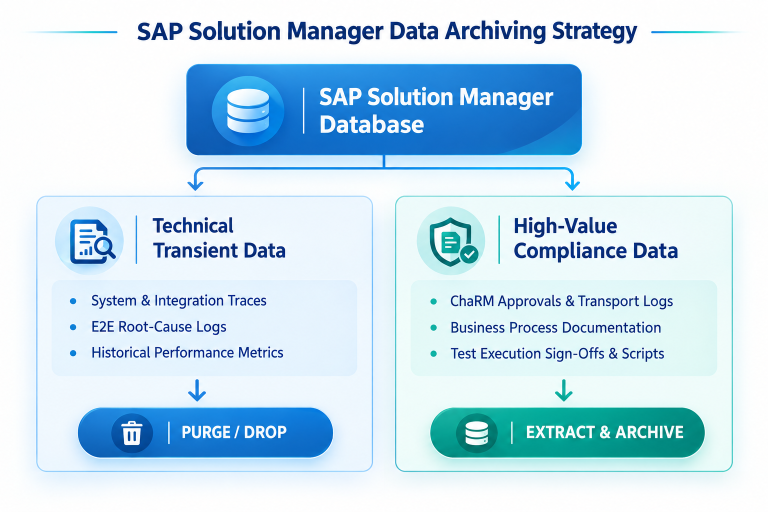
SAP Solution Manager environments accumulate multi-terabyte database footprints over time. Successfully decommissioning these systems requires distinguishing between transient technical logs and long-term compliance records.
High-Value Compliance Data (Extract & Archive)

Change Request Management (ChaRM) Audit Trails: Transport histories, change approvals, functional sign-offs, and release records required for SOX and regulatory audits.

Business Process Documentation: Process flow definitions, custom specifications, and functional blueprints.

Test Suite Records: Execution logs, sign-offs, and compliance verification histories.

Transient Technical Data (Purge)
Technical monitoring logs, E2E root-cause analysis traces, system availability metrics, and old background job logs. These records hold little long-term value once operational monitoring moves to SAP Cloud ALM.

A 3-Step Playbook for SolMan Decommissioning
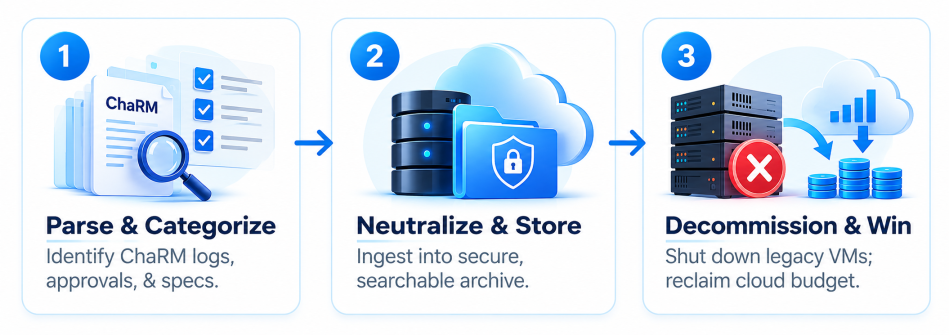
A structured extraction and archiving framework enables organizations to shut down legacy SolMan infrastructure while maintaining full audit compliance.
Step 1: Parse and Categorize Historical Objects
Identify all ChaRM change logs, approval workflows, test execution records, and business process documents stored within SolMan. Isolate these objects from temporary system logs to ensure only compliance-critical data is targeted for extraction.
Step 2: Extract to a Secure, Vendor-Neutral Archive

Transfer historical records into a lightweight, vendor-neutral archive platform—such as Infobelt. Converting proprietary tables into standardized, searchable data structures ensures long-term accessibility for internal and external auditors without relying on active SAP application servers.

Step 3: Decommission Underlying Infrastructure
Once historical data is safely archived and validated, shut down the SolMan application servers and databases. Decommissioning these environments eliminates hosting expenses, reduces security attack surfaces, and frees up infrastructure capacity.
Data Retrieval Across Structured and Unstructured Records
A key challenge when retiring SAP Solution Manager is managing diverse data formats. Solution Manager contains relational database tables (such as ChaRM transport tables and execution logs) alongside unstructured files (such as attached business process functional specs, PDF test sign-offs, and Word document blueprints).

Using Infobelt Omni Archive Manager (OAM™), organizations can ingest both structured relational records and unstructured attachments into a single, unified archive platform. OAM applies automated full-text indexing, metadata enrichment, and WORM (Write Once, Read Many) tamper-proof protections across all extracted SolMan artifacts—ensuring complete document-level searchability during regulatory audits.

Strategic Benefits Across the Enterprise
Traditional legacy data retrieval often requires staging databases or restoring archives back into native application environments—a slow process that recreates technical overhead.

Infobelt’s proprietary Archive Query Language (AQL™) eliminates the need to restore archived files or re-spin up SAP application servers. AQL enables authorized teams to query, filter, and extract high-value historical records directly from compressed and encrypted storage tiers. Whether compliance auditors need specific ChaRM approval records from five years ago or transport histories across past release cycles, results are returned on demand while leaving underlying legacy servers permanently powered off.

Direct Archive Querying Without Native System Restoration
Accessing archived legacy data no longer requires writing complex database queries or navigating proprietary SAP table structures.

Infobelt AQL-Copilot™ brings Generative AI and Natural Language Processing (NLP) to historical enterprise archives. Through an intuitive ChatGPT-like conversational interface, compliance officers, business users, and IT managers can ask natural language questions in plain English—such as “Show all approved ChaRM transport requests for Finance releases in Q3 2024”.

AQL-Copilot dynamically analyzes the underlying archive data model, generates and executes the appropriate queries behind the scenes, and presents ready-to-export audit reports in formats like CSV, JSON, or SQL—slashing audit response times from weeks to seconds while maintaining fine-grained security controls and sensitive data masking.

Strategic Benefits Across the Enterprise
  • For CIOs & Financial Leadership: Predictable cost reduction by eliminating ongoing cloud hosting, database licensing, and operational maintenance for legacy servers.
  • For Enterprise Architects: Complete alignment with SAP Clean Core strategies by decoupling active operational tooling from legacy compliance data.
  • For Infrastructure & Storage Teams: Instant reclamation of storage capacity and virtual infrastructure, simplifying overall environment management.
  • For Compliance & Audit Teams: Fast, centralized, and searchable access to historical ChaRM approvals and transport logs in a tamper-evident system.
Prepare for 2027 Today
Navigating the transition from SAP Solution Manager to SAP Cloud ALM does not require carrying legacy server baggage into the future. By implementing a proactive data extraction and archiving strategy, organizations can secure their historical compliance records, simplify their IT landscape, and retire legacy infrastructure with confidence.

Planning your SAP Cloud ALM transition? Contact Infobelt to discover how our data archiving and application retirement solutions streamline SolMan decommissioning and lower your cloud infrastructure costs.